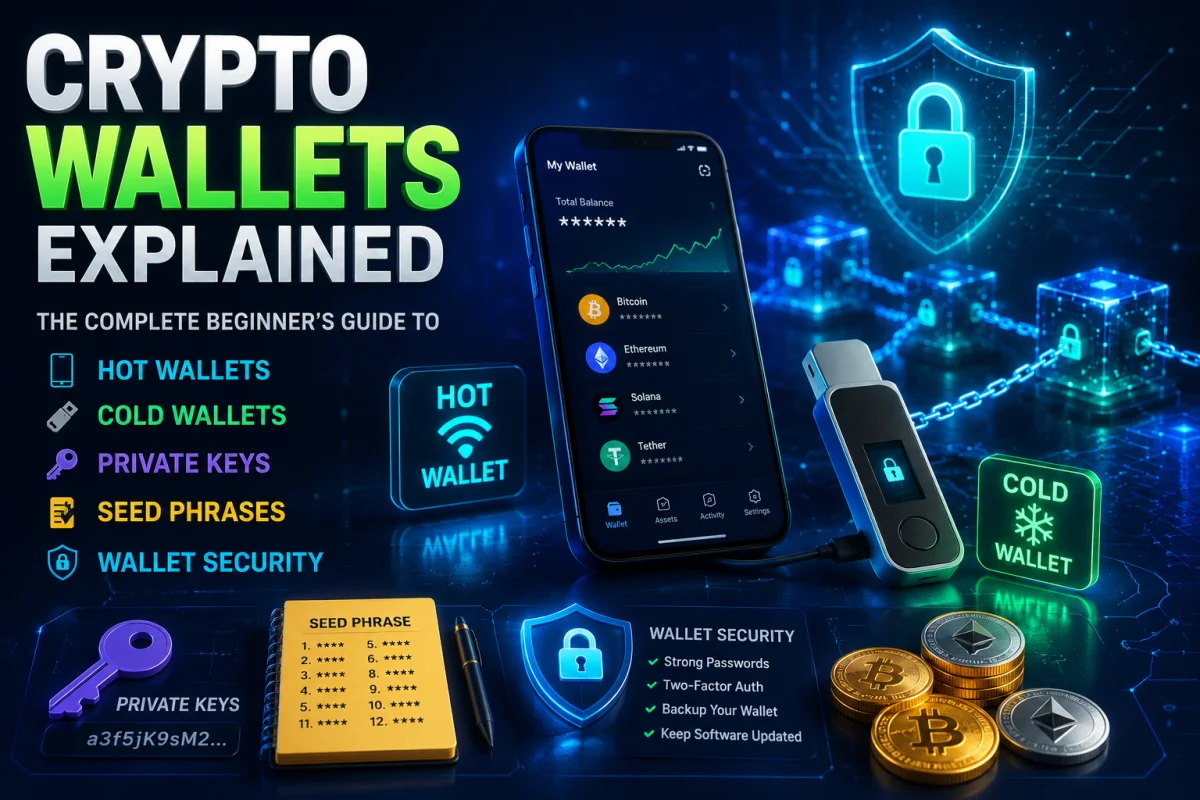
Imagine buying your first Bitcoin or Ethereum. You are excited to own cryptocurrency, but then someone asks:
"Which wallet are you going to use?"
If you are new to crypto, this question can be confusing. Many beginners think a crypto wallet is just another app where coins are stored. In reality, crypto wallets work very differently from physical wallets or traditional bank accounts.
Understanding how crypto wallets work is one of the most important skills in your cryptocurrency journey. A small mistake—such as sharing your private key, losing your recovery phrase, or sending funds to the wrong address—can lead to permanent loss of your digital assets.
The good news is that crypto wallets are not difficult to understand once you learn the basics.
In this module, you'll discover what crypto wallets are, how they work behind the scenes, the differences between hot and cold wallets, and how private keys, public addresses, and seed phrases keep your cryptocurrency secure. You'll also learn practical security tips, common scams to avoid, and best practices used by experienced crypto users.
By the end of this guide, you'll have the knowledge to confidently choose the right wallet, protect your digital assets, and safely send and receive cryptocurrency.
Learning Objectives
After completing this module, you will be able to:
- Explain what a crypto wallet is and how it works.
- Understand why crypto wallets do not actually store cryptocurrency.
- Differentiate between hot wallets and cold wallets.
- Identify different types of crypto wallets and their use cases.
- Understand the purpose of private keys, public addresses, and seed phrases.
- Send and receive cryptocurrency safely.
- Protect your wallet from scams, phishing attacks, and hackers.
- Choose the right wallet based on your investment goals.
- Follow industry best practices to keep your crypto secure.
Section 1: What Is a Crypto Wallet?

A crypto wallet is a digital tool that allows you to access, send, receive, and manage cryptocurrency on a blockchain.
Unlike a physical wallet that stores cash or credit cards, a crypto wallet does not actually store your cryptocurrency.
Instead, it stores the cryptographic keys that prove you own specific digital assets on the blockchain.
Think of a crypto wallet as a secure digital keychain. The blockchain holds the records of every cryptocurrency transaction, while your wallet gives you the keys needed to access and control your funds.
Without these keys, you cannot spend, transfer, or manage your cryptocurrency.
A Common Misunderstanding
Many beginners believe that Bitcoin, Ethereum, or other cryptocurrencies are stored inside their wallet app.
This is not true.
Your cryptocurrency always remains on the blockchain—a public digital ledger shared across thousands of computers worldwide.
Your wallet simply provides access to your funds by managing your cryptographic keys.
In other words:
- Blockchain = Stores the ownership records
- Wallet = Stores the keys that prove ownership
This distinction is one of the most important concepts in cryptocurrency.
Real-Life Analogy: Your House and Its Key
Imagine you own a house.
The house represents your cryptocurrency.
The neighborhood where the house is located represents the blockchain.
Your house key represents your crypto wallet.
The key does not contain the house. Instead, it gives you access to the house whenever you need it.
If someone steals your house key, they can enter your house.
Similarly, if someone gains access to your wallet's private key or recovery phrase, they can control your cryptocurrency.
Another Analogy: Online Banking
Consider your online bank account.
Your money is not stored inside your banking app. Instead:
- The bank securely holds your funds.
- Your username and password allow you to access your account.
Crypto wallets work similarly, but with one major difference.
In cryptocurrency, you are responsible for your own security. There is usually no bank or customer support team that can recover your funds if you lose your private key or recovery phrase.
This is why many people in crypto say:
"Not your keys, not your coins."
This means that if someone else controls your private keys—such as a centralized exchange—they ultimately control access to your cryptocurrency.
What Can a Crypto Wallet Do?
A crypto wallet allows you to perform several important functions:
Receive Cryptocurrency
Every wallet generates one or more public addresses that other people can use to send you cryptocurrency.
For example, if a friend wants to send you Bitcoin, you simply share your Bitcoin wallet address.
Send Cryptocurrency
Your wallet signs transactions using your private key, proving that you are the rightful owner of the funds before broadcasting the transaction to the blockchain.
Check Your Balance
Wallets display your cryptocurrency balances by reading information directly from the blockchain.
Your balance is calculated from blockchain data—not from information stored inside the wallet itself.
View Transaction History
Most wallets allow you to see:
- Incoming transactions
- Outgoing transactions
- Transaction IDs (Hashes)
- Confirmation status
- Network fees paid
Manage Multiple Cryptocurrencies
Many modern wallets support multiple blockchain networks and digital assets, allowing users to manage Bitcoin, Ethereum, Solana, BNB Chain, Polygon, and many other cryptocurrencies in one place.
However, not every wallet supports every blockchain, so always verify compatibility before transferring funds.
Why Do Crypto Wallets Matter?
Without a wallet, you cannot interact with most blockchain networks.
A wallet is your gateway to the crypto ecosystem.
It enables you to:
- Store access to your digital assets.
- Participate in decentralized finance (DeFi).
- Buy, sell, and trade cryptocurrencies.
- Collect NFTs.
- Use blockchain applications (dApps).
- Stake cryptocurrencies.
- Receive payments from anyone in the world.
Whether you are investing a small amount or managing a large portfolio, choosing the right wallet is essential for protecting your assets.
Example: Buying Your First Bitcoin
Let's say Sarah purchases $100 worth of Bitcoin from a cryptocurrency exchange.
At first, her Bitcoin remains in her exchange account.
Later, Sarah decides to move her Bitcoin into her own crypto wallet for better security.
She installs a trusted wallet, creates a new wallet, safely writes down her recovery phrase, and receives a Bitcoin address.
She then withdraws her Bitcoin from the exchange to her wallet address.
Although Sarah now controls her Bitcoin through her wallet, the Bitcoin itself remains recorded on the Bitcoin blockchain. Her wallet simply provides the secure keys needed to access and manage it.
This is one of the biggest milestones for any crypto user—taking direct control of their digital assets.
Did You Know?
Many early Bitcoin users lost access to their cryptocurrency simply because they misplaced or discarded the devices containing their wallet information or forgot their recovery details. Since blockchain networks have no central authority to reset passwords or recover lost keys, those funds may remain permanently inaccessible.
Myth vs Reality
| Myth | Reality |
|---|---|
| My crypto is stored inside my wallet app. | Your cryptocurrency remains on the blockchain. Your wallet stores the keys that allow you to access it. |
| If I lose my phone, I automatically lose my crypto. | If you have safely backed up your recovery phrase, you can restore your wallet on another compatible device. |
| Anyone can steal my crypto by knowing my wallet address. | Your public wallet address can safely be shared. Only your private key or recovery phrase must remain secret. |
| Every wallet works with every cryptocurrency. | Different wallets support different blockchain networks and digital assets. Always check compatibility before sending funds. |
Pro Tips
- Use wallets only from trusted developers and official sources.
- Back up your recovery phrase immediately after creating a wallet.
- Never share your private key or seed phrase with anyone.
- Double-check wallet addresses before sending cryptocurrency.
- Start with a small test transaction when sending large amounts.
Key Takeaways
- A crypto wallet is a digital tool that helps you manage cryptocurrency.
- Wallets do not store coins—they store cryptographic keys.
- The blockchain records ownership of all cryptocurrency.
- Your wallet allows you to send, receive, and manage digital assets.
- Protecting your wallet is essential because you are responsible for your own security.
Knowledge Check – Section 1
Multiple Choice Questions
1. What does a crypto wallet actually store?
A. Cryptocurrency coins
B. Cash
C. Cryptographic keys ✅
D. Bank account information
2. Where is your cryptocurrency stored?
A. Inside your phone
B. Inside the wallet app
C. On the blockchain ✅
D. On your SIM card
3. Which statement is true?
A. Losing your phone always means losing your crypto.
B. Public wallet addresses should always remain secret.
C. Crypto wallets help you access and manage assets recorded on the blockchain. ✅
D. Every wallet supports every cryptocurrency.
4. What should never be shared with anyone?
A. Wallet address
B. Transaction ID
C. Private key or recovery phrase ✅
D. Blockchain explorer link
5. Why is a crypto wallet important?
A. It mines cryptocurrency.
B. It stores physical coins.
C. It provides secure access to your digital assets on the blockchain. ✅
D. It guarantees investment profits.
How Crypto Wallets Work
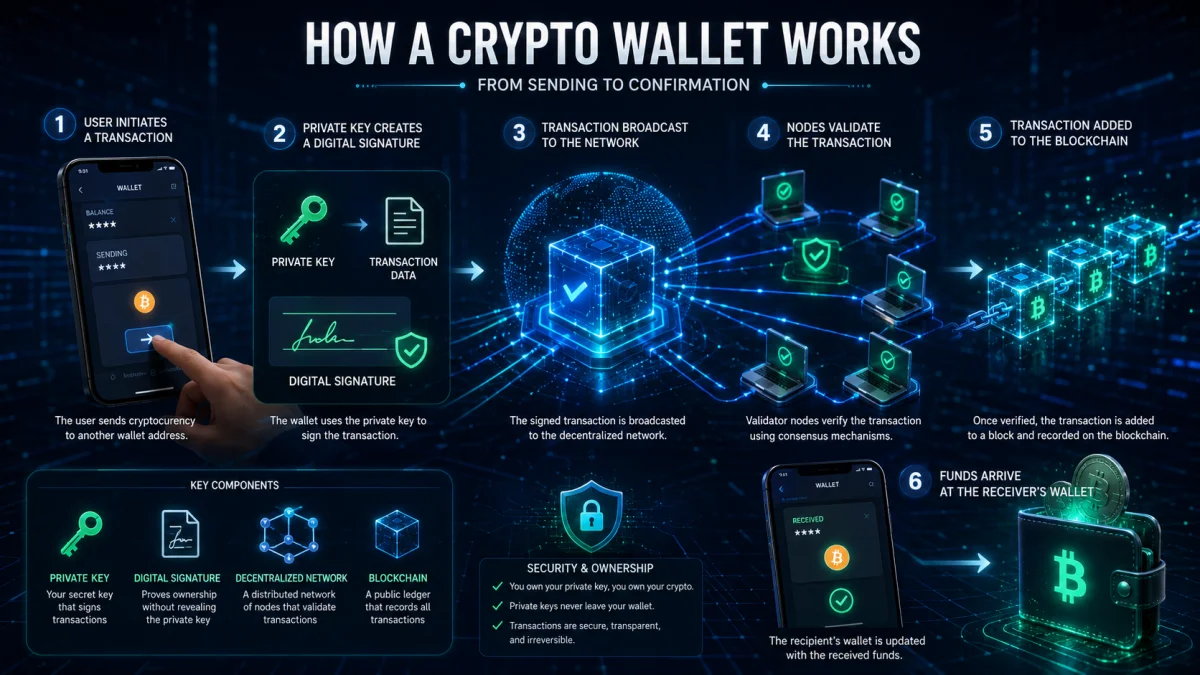
Now that you know what a crypto wallet is, let's explore how it actually works behind the scenes.
At first, crypto wallets may seem complicated because they involve concepts like cryptography, blockchain networks, and digital signatures. However, the basic process is surprisingly simple.
Whenever you send cryptocurrency, your wallet performs several actions automatically in just a few seconds.
Think of it as sending an email.
You type the recipient's address, write your message, and click Send. Your email application handles all the technical work in the background.
Crypto wallets work in a similar way. You only see a few buttons, but behind the scenes, powerful cryptography protects every transaction.
The Five-Step Process
Whenever you send cryptocurrency, these five steps happen:
Step 1: You Create a Transaction
You enter:
- The recipient's wallet address
- The amount of cryptocurrency
- The blockchain network (if applicable)
- Any additional information such as a Memo or Tag (required by some networks)
Example:
Ahmed wants to send 0.5 ETH to his friend Sara.
He enters Sara's Ethereum address and presses Send.
At this point, the transaction has not yet been completed.
Step 2: Your Wallet Proves Ownership
Before the blockchain accepts the transaction, it needs proof that Ahmed actually owns the Ethereum he wants to send.
This is where the private key becomes important.
Your wallet uses your private key to create a unique digital signature.
Think of a digital signature as your personal approval stamp.
It tells the blockchain:
"I am the owner of these funds, and I authorize this transaction."
The private key never leaves your wallet.
Instead, it is used internally to generate the digital signature, which is then sent to the blockchain for verification.
This design keeps your private key secure while still proving ownership.
Step 3: The Transaction Is Broadcast
Once signed, the wallet sends the transaction to the blockchain network.
Thousands of computers around the world—called nodes or validators—receive the transaction.
These computers independently check whether:
- The digital signature is valid.
- The sender has enough funds.
- The transaction follows the network's rules.
- The transaction has not already been spent (preventing double spending).
Because many independent computers perform these checks, no single person or company controls the verification process.
Step 4: The Blockchain Verifies the Transaction
If the transaction is valid, it is grouped together with other transactions into a new block.
The blockchain network then permanently records this block.
Once recorded, changing or deleting the transaction becomes extremely difficult because every participating computer has a copy of the blockchain.
This is one reason blockchain technology is considered secure and transparent.
Step 5: The Recipient Receives the Funds
After the transaction receives enough confirmations, the recipient's wallet updates the balance.
Sara now sees the 0.5 ETH in her wallet.
Although the wallet displays the new balance, the Ethereum itself still exists on the blockchain.
The wallet simply reads the updated blockchain data and presents it in an easy-to-understand way.
Visualizing the Process
You can think of the transaction like this:
You
   │
   ▼
Wallet
   │
   ▼
Private Key Creates Digital Signature
   │
   ▼
Blockchain Network
   │
   ▼
Validators Verify Transaction
   │
   ▼
Transaction Added to Block
   │
   ▼
Recipient Receives Cryptocurrency
What Happens Behind the Scenes?
Let's simplify what your wallet does every time you press Send.
Instead of simply moving coins from one place to another, your wallet:
- Checks your balance.
- Creates a transaction request.
- Uses your private key to sign it.
- Broadcasts it to the blockchain.
- Waits for confirmation.
- Updates your wallet balance.
All of this usually happens within seconds or minutes, depending on the blockchain network.
Understanding Digital Signatures
A digital signature is one of the most important security features in cryptocurrency.
It proves that a transaction was approved by the owner of the wallet without revealing the private key.
Imagine signing a legal document with your handwritten signature.
Anyone can compare your signature to verify it belongs to you, but they cannot use that signature to recreate your handwriting exactly.
A digital signature works in a similar way.
It proves authenticity while keeping the secret information (your private key) hidden.
Why the Private Key Never Leaves Your Wallet
One of the smartest parts of blockchain technology is that your private key does not travel across the internet during a transaction.
Instead:
- Your wallet keeps the private key securely stored.
- It creates a digital signature.
- Only the digital signature is shared with the blockchain.
This greatly reduces the risk of someone intercepting your private key during a transaction.
Why Doesn't the Blockchain Need Your Name?
Traditional banks verify your identity using:
- Your name
- Your address
- Government-issued ID
- Account number
Most public blockchains work differently.
They identify users through wallet addresses, not personal identities.
For example:
Instead of:
Ahmed Khan
The blockchain only sees something like:
0x7A...91D4
This allows anyone to participate without revealing personal information, although blockchain transactions are generally public and traceable through wallet addresses.
Real-Life Example: Sending Bitcoin
Let's walk through a complete example.
Ali wants to send 0.01 BTC to his sister.
Step 1
Ali opens his Bitcoin wallet.
Step 2
He enters his sister's Bitcoin address.
Step 3
He enters 0.01 BTC.
Step 4
His wallet signs the transaction using his private key.
Step 5
The Bitcoin network verifies the digital signature.
Step 6
Miners or validators include the transaction in a new block.
Step 7
After the required confirmations, Ali's sister receives the Bitcoin.
Notice something important:
At no point did Bitcoin leave Ali's phone.
The blockchain simply updated its record of ownership.
Why Blockchain Verification Is Important
Without verification, someone could try to spend the same cryptocurrency twice.
This problem is known as double spending.
Blockchain networks prevent double spending by ensuring that every transaction is verified and permanently recorded before ownership changes.
This verification process is one of the key reasons cryptocurrencies can operate without a central bank.
Common Misunderstandings
Myth: My wallet sends coins directly to another wallet.
Reality:
The blockchain updates its ownership records. Wallets create and sign transactions—they don't physically move coins.
Myth: My private key is sent to the blockchain.
Reality:
Your private key stays safely inside your wallet. Only a digital signature is shared.
Myth: Transactions happen instantly.
Reality:
Some networks confirm transactions within seconds, while others may take several minutes or longer depending on network congestion and the blockchain being used.
Did You Know?
Every cryptocurrency transaction is assigned a unique Transaction ID (TXID), also called a transaction hash. You can use this ID on a blockchain explorer to track the transaction's status, confirmations, and details.
Pro Tips
- Always verify the recipient's wallet address before sending funds.
- Double-check that you're using the correct blockchain network.
- For large transfers, send a small test transaction first.
- Keep enough cryptocurrency in your wallet to cover network (gas) fees when required.
- Be patient—confirmation times vary between blockchains.
Key Takeaways
- A crypto wallet creates and signs transactions using your private key.
- Your private key never leaves your wallet.
- The blockchain verifies every transaction before updating ownership.
- Digital signatures prove ownership without exposing your private key.
- Cryptocurrency remains on the blockchain; wallets provide secure access to it.
Knowledge Check – Section 2
Multiple Choice Questions
1. What happens immediately after you press "Send" in your crypto wallet?
A. The coins leave your phone permanently.
B. The wallet creates and signs a transaction. ✅
C. The blockchain shuts down temporarily.
D. Your private key is sent to the recipient.
2. What is the purpose of a digital signature?
A. To increase the price of cryptocurrency.
B. To prove that the transaction was authorized by the wallet owner. ✅
C. To store cryptocurrency.
D. To create a new wallet.
3. Does your private key leave your wallet during a transaction?
A. Yes
B. Only for Bitcoin
C. Only for Ethereum
D. No ✅
4. Who verifies crypto transactions?
A. A central bank
B. Your internet provider
C. Thousands of blockchain nodes or validators. ✅
D. Your wallet developer
5. What prevents double spending in cryptocurrency?
A. Antivirus software
B. The blockchain's transaction verification process. ✅
C. Your phone password
D. A bank manager
Quick Knowledge Test
True or False
- A crypto wallet moves coins directly from one phone to another. (False)
- Your private key remains secure inside your wallet during transactions. (True)
- Blockchain validators check whether a transaction is valid before it is recorded. (True)
- Every blockchain transaction has a unique Transaction ID (TXID). (True)
- Cryptocurrency is stored inside your wallet application. (False)
Types of Crypto Wallets
Cryptocurrency wallets come in many different forms. While every wallet performs the same basic job—allowing you to access and manage your cryptocurrency—they differ in how they store your keys, connect to the internet, and balance security with convenience.
Some wallets are designed for everyday use, while others focus on long-term storage and maximum protection.
Understanding the different types of wallets will help you choose the one that best matches your needs.
Overview of Crypto Wallet Types
Crypto wallets can be grouped into several categories.
| Wallet Type | Internet Connection | Security | Ease of Use | Best For |
|---|---|---|---|---|
| Mobile Wallet | Online | Medium | Very Easy | Daily payments |
| Desktop Wallet | Usually Online | Medium to High | Easy | Personal computers |
| Web Wallet | Online | Medium | Very Easy | Quick access |
| Browser Extension Wallet | Online | Medium | Easy | DeFi and Web3 |
| Hardware Wallet | Offline | Very High | Moderate | Long-term storage |
| Paper Wallet | Offline | High (if created securely) | Difficult | Offline backup |
| Custodial Wallet | Usually Online | Depends on provider | Very Easy | Beginners |
| Non-Custodial Wallet | Depends on wallet | High | Moderate | Full ownership |
No single wallet is perfect for everyone. The right choice depends on how often you use cryptocurrency, how much you own, and how much responsibility you're willing to take for securing your funds.
Software Wallets
A software wallet is any crypto wallet that runs as software on a digital device.
This includes:
- Mobile wallets
- Desktop wallets
- Web wallets
- Browser extension wallets
Software wallets are the most common choice for beginners because they are free, easy to install, and simple to use.
However, because they are usually connected to the internet, they are generally less secure than hardware wallets.
Advantages
- Free to use
- Easy to install
- Quick access to funds
- Supports many cryptocurrencies
- Ideal for beginners
Disadvantages
- Connected to the internet
- More vulnerable to malware
- Greater risk from phishing attacks
- Device security becomes very important
Mobile Wallets
A mobile wallet is an app installed on your smartphone or tablet.
It allows you to manage cryptocurrency wherever you go.
Most mobile wallets include features such as:
- QR code scanning
- Biometric login
- Push notifications
- Portfolio tracking
- Built-in token swaps
- Staking support (on supported networks)
Real-Life Example
Imagine you're buying coffee from a café that accepts Bitcoin.
Instead of using a credit card, you scan the café's QR code with your mobile wallet and confirm the payment in seconds.
This convenience makes mobile wallets ideal for everyday crypto use.
Best For
- Beginners
- Everyday spending
- Small investments
- Frequent transactions
Advantages
- Portable
- Fast payments
- Easy to use
- Supports QR codes
- Great for travel
Disadvantages
- Risk if your phone is infected with malware
- Vulnerable if your phone is stolen and poorly secured
- Not recommended for storing very large amounts
Desktop Wallets
Desktop wallets are software programs installed on a computer.
They generally offer more features than mobile wallets and may provide greater security if your computer is well protected.
Desktop wallets are popular among users who trade regularly or manage multiple cryptocurrencies.
Real-Life Example
Emma works from home and manages her crypto investments using her personal computer.
She uses a desktop wallet protected with a strong password, antivirus software, and regular backups.
Best For
- Home users
- Active investors
- Crypto enthusiasts
- Portfolio management
Advantages
- Larger interface
- More advanced features
- Better organization
- Easier portfolio management
Disadvantages
- Vulnerable to computer viruses
- Risk from malware
- Cannot be accessed when away from your computer unless restored elsewhere
Web Wallets
A web wallet runs inside a web browser without requiring software installation.
Some cryptocurrency exchanges also provide web-based wallets to their users.
Because they can be accessed from almost any device with an internet connection, web wallets are extremely convenient.
However, convenience often comes with additional security considerations.
Real-Life Example
James logs into his exchange account through a web browser to check his cryptocurrency balance before making a trade.
Advantages
- Accessible from almost anywhere
- No installation required
- Beginner-friendly
- Quick access
Disadvantages
- Depends heavily on account security
- Greater exposure to phishing websites
- Security varies between providers
Browser Extension Wallets
Browser extension wallets are installed as extensions in browsers such as Chrome, Firefox, Brave, or Edge.
These wallets are widely used for interacting with decentralized applications (dApps), NFT marketplaces, and decentralized finance (DeFi) platforms.
Instead of copying wallet addresses manually, browser wallets allow websites to securely request wallet connections.
Real-Life Example
Olivia wants to purchase an NFT.
She opens an NFT marketplace, clicks Connect Wallet, approves the connection in her browser extension wallet, and completes the purchase.
Advantages
- Excellent for Web3
- Easy connection to decentralized applications
- Quick transaction approvals
- Supports NFTs
Disadvantages
- Connected to the internet
- Can be targeted by fake websites
- Users must carefully verify permissions before approving wallet connections
Hardware Wallets
A hardware wallet is a physical device specifically designed to store your private keys offline.
Unlike software wallets, hardware wallets are not continuously connected to the internet.
Even when connected to a computer to sign a transaction, the private keys remain protected inside the device.
This makes hardware wallets one of the safest ways to store cryptocurrency.
Real-Life Example
Michael owns approximately $50,000 worth of cryptocurrency.
Instead of leaving it on an exchange, he transfers it to a hardware wallet and stores the device securely at home.
Even if his computer becomes infected with malware, his private keys remain protected inside the hardware wallet.
Best For
- Long-term investors
- Large crypto holdings
- Maximum security
Advantages
- Extremely secure
- Private keys remain offline
- Resistant to online attacks
- Excellent for long-term storage
Disadvantages
- Must be purchased
- Less convenient for daily transactions
- Requires careful backup of the recovery phrase
Paper Wallets
A paper wallet is a printed copy of your wallet's public address and private key or recovery information.
Years ago, paper wallets were more common because they kept keys completely offline.
Today, they are used far less often because they are easy to damage, lose, or generate incorrectly.
Real-Life Example
David prints his wallet information and stores it inside a waterproof, fire-resistant safe.
While the wallet cannot be hacked online, it could still be destroyed by fire, flooding, or accidental damage if not stored properly.
Advantages
- Completely offline
- No electronic hacking risk
- Low cost
Disadvantages
- Easy to lose
- Can be damaged
- Difficult for beginners
- Not recommended unless created securely
Custodial Wallets
A custodial wallet is managed by another company on your behalf.
This is common with cryptocurrency exchanges.
The provider controls the private keys, while you access your account using a username and password.
Although custodial wallets are convenient, you rely on the provider to protect your funds and maintain access.
Real-Life Example
Sophia buys cryptocurrency on an exchange and leaves it there.
She can log in easily, but the exchange—not Sophia—controls the private keys.
If the exchange experiences security issues, freezes withdrawals, or closes operations, access to her funds may be affected.
Advantages
- Easy recovery options
- Beginner-friendly
- Convenient
- Customer support
Disadvantages
- You do not control the private keys
- Dependent on the provider
- Account restrictions may apply
Non-Custodial Wallets
A non-custodial wallet gives you complete control over your private keys.
No company can access, freeze, or recover your wallet.
This provides greater freedom but also greater responsibility.
If you lose your recovery phrase, there is usually no way to recover your wallet.
Real-Life Example
Daniel creates his own wallet, writes down his recovery phrase, and stores it safely in two secure locations.
Because he controls the private keys, only he can authorize transactions.
Advantages
- Full ownership
- Greater privacy
- No reliance on third parties
- Better long-term security
Disadvantages
- You are fully responsible for backups
- Lost recovery phrases may result in permanent loss of funds
- No password reset option
Custodial vs. Non-Custodial Wallets
| Feature | Custodial Wallet | Non-Custodial Wallet |
|---|---|---|
| Controls Private Keys | Provider | You |
| Password Recovery | Usually Available | Usually Not Available |
| Full Ownership | No | Yes |
| Customer Support | Yes | Limited |
| Responsibility | Lower | Higher |
| Best For | Beginners | Experienced users and long-term holders |
Which Wallet Should You Choose?
There is no universal answer.
Instead, choose based on how you plan to use cryptocurrency.
| Situation | Recommended Wallet |
|---|---|
| Buying crypto for the first time | Custodial or Mobile Wallet |
| Daily payments | Mobile Wallet |
| Trading regularly | Desktop or Exchange Wallet |
| Using DeFi | Browser Extension Wallet |
| Collecting NFTs | Browser Extension Wallet |
| Long-term investing | Hardware Wallet |
| Holding large amounts | Hardware Wallet |
Many experienced crypto users actually use multiple wallets.
For example:
- A mobile wallet for everyday spending.
- A browser wallet for DeFi and NFTs.
- A hardware wallet for long-term savings.
This approach balances convenience with security.
Did You Know?
Many cryptocurrency investors follow a simple rule:
Only keep the amount you need for daily use in an online wallet. Store long-term investments in a secure offline wallet whenever possible.
This strategy helps reduce the risk of losing large amounts of cryptocurrency to online threats.
Pro Tips
- Choose a wallet that supports the blockchain you plan to use.
- Download wallets only from official websites or trusted app stores.
- Enable biometric authentication or a strong PIN where available.
- Back up your recovery phrase immediately after creating a wallet.
- Don't rely on a single wallet for all your crypto holdings.
Key Takeaways
- Crypto wallets come in different types, each with unique strengths and weaknesses.
- Software wallets are convenient and suitable for everyday use.
- Hardware wallets provide one of the highest levels of security for long-term storage.
- Custodial wallets are managed by a third party, while non-custodial wallets give you full control of your private keys.
- Many experienced users combine different wallet types based on their needs.
Knowledge Check – Section 3
Multiple Choice Questions
1. Which wallet type stores private keys offline using a dedicated physical device?
A. Web Wallet
B. Browser Extension Wallet
C. Hardware Wallet ✅
D. Mobile Wallet
2. Which wallet is generally best suited for long-term storage of large cryptocurrency holdings?
A. Mobile Wallet
B. Desktop Wallet
C. Hardware Wallet ✅
D. Web Wallet
3. In a custodial wallet, who controls the private keys?
A. The blockchain
B. The wallet owner
C. The service provider or exchange ✅
D. Internet providers
4. Which wallet type is commonly used for interacting with decentralized applications (dApps)?
A. Paper Wallet
B. Browser Extension Wallet ✅
C. Hardware Wallet
D. Desktop Wallet
5. Which statement about non-custodial wallets is correct?
A. The exchange manages your recovery phrase.
B. You have full control of your private keys. ✅
C. Customer support can always recover your wallet.
D. They do not require backups.
True or False
- Every crypto wallet offers the same level of security. False
- Hardware wallets keep private keys offline. True
- Browser extension wallets are commonly used with DeFi applications. True
- Paper wallets are the most popular choice for beginners today. False
- Many experienced crypto users use more than one wallet. True
Hot Wallets
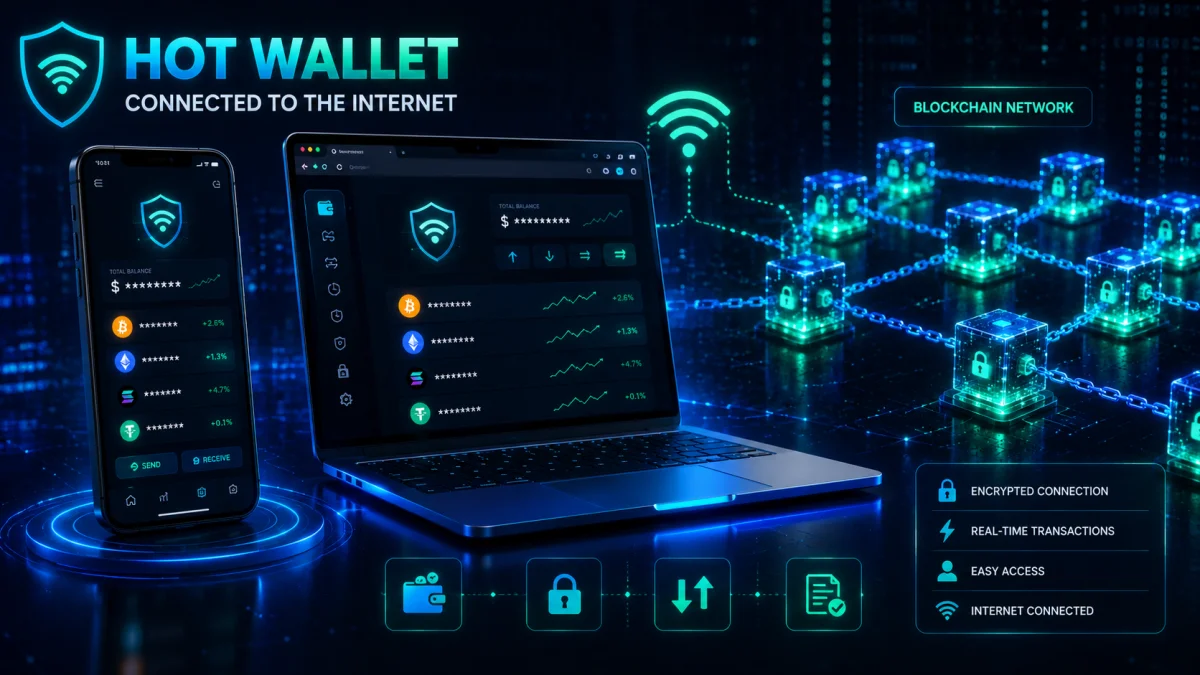
A hot wallet is a cryptocurrency wallet that is connected to the internet.
Because it is online, a hot wallet allows you to access your cryptocurrency quickly and make transactions at any time.
Hot wallets are the most commonly used wallets in the crypto industry because they are convenient, easy to set up, and usually free.
If you've ever used a cryptocurrency exchange, a mobile wallet app, or a browser extension wallet, you've probably already used a hot wallet.
Why Is It Called a "Hot" Wallet?
The word "hot" simply means connected to the internet.
Since the wallet is online, it can communicate with blockchain networks instantly.
This allows you to:
- Send cryptocurrency within seconds.
- Receive payments anytime.
- Connect to decentralized applications (dApps).
- Trade cryptocurrencies quickly.
- Manage your portfolio from almost anywhere.
However, being connected to the internet also means hot wallets face more online security risks than offline wallets.
How Does a Hot Wallet Work?
A hot wallet securely stores your private keys on an internet-connected device.
When you send cryptocurrency:
- You enter the recipient's wallet address.
- Your wallet creates a transaction.
- The wallet uses your private key to digitally sign the transaction.
- The signed transaction is sent to the blockchain network.
- Validators confirm the transaction.
- The recipient receives the cryptocurrency.
This entire process usually takes only a few seconds before the transaction begins being processed by the blockchain.
Common Types of Hot Wallets
Several wallet types fall into the hot wallet category.
Mobile Wallets
Installed on smartphones and tablets.
Best for:
- Daily spending
- Quick payments
- Beginners
- Travel
Examples include wallets designed for Bitcoin, Ethereum, Solana, and many multi-chain assets.
Desktop Wallets
Installed on Windows, macOS, or Linux computers.
Best for:
- Home users
- Frequent investors
- Portfolio management
Browser Extension Wallets
Installed inside web browsers.
Commonly used for:
- DeFi
- NFTs
- Web3 applications
- Token swaps
- Blockchain gaming
Web Wallets
Accessed through a web browser.
Often provided by:
- Cryptocurrency exchanges
- Online wallet services
- Web-based blockchain platforms
Advantages of Hot Wallets
Hot wallets are popular because they make cryptocurrency easy to use.
Fast Transactions
You can send and receive cryptocurrency almost instantly.
This is ideal for:
- Traders
- Businesses
- Freelancers
- Everyday payments
Easy to Set Up
Creating a hot wallet usually takes only a few minutes.
Most wallets guide you through:
- Creating a wallet
- Backing up your recovery phrase
- Setting a password or PIN
Even beginners can complete the process without technical knowledge.
Free or Low Cost
Most hot wallets can be downloaded and used for free.
Unlike hardware wallets, there is usually no device to purchase.
Supports Multiple Cryptocurrencies
Many modern hot wallets support hundreds or even thousands of digital assets.
This allows users to manage multiple cryptocurrencies from one application.
Access Anywhere
Because they're connected to the internet, hot wallets let you manage your cryptocurrency from almost anywhere in the world.
All you need is:
- Your device
- Internet access
- Your wallet credentials
Easy Integration with Web3
Hot wallets are essential for interacting with many blockchain applications.
For example, they can connect to:
- NFT marketplaces
- Decentralized exchanges (DEXs)
- Staking platforms
- Blockchain games
- Lending protocols
Without a compatible hot wallet, many decentralized services cannot be accessed.
Disadvantages of Hot Wallets
While convenient, hot wallets also carry additional risks.
Greater Exposure to Hackers
Because they remain online, attackers may attempt to target hot wallets through:
- Malware
- Phishing websites
- Fake wallet apps
- Malicious browser extensions
- Social engineering
A well-secured wallet can significantly reduce these risks, but no internet-connected device is completely immune.
Device Security Matters
If your phone or computer is compromised, your wallet may also be at risk.
For example:
A phone infected with malware could attempt to:
- Monitor your activity.
- Replace copied wallet addresses.
- Capture passwords through keylogging.
- Trick you into approving fraudulent transactions.
Human Error
Many crypto losses happen because users make simple mistakes.
Examples include:
- Sending funds to the wrong address.
- Installing fake wallet apps.
- Sharing their recovery phrase.
- Connecting to fraudulent websites.
Most wallet losses are caused by human error rather than weaknesses in blockchain technology.
Real-Life Example: Paying with a Hot Wallet
Sarah uses a mobile wallet to hold a small amount of cryptocurrency.
One day, she visits a coffee shop that accepts Bitcoin payments.
The cashier displays a QR code.
Sarah scans the QR code with her wallet, confirms the amount, reviews the recipient's address, and approves the transaction.
Within moments, the payment is broadcast to the blockchain, and the café receives confirmation.
The entire process is quick, convenient, and similar to using a digital payment app.
Real-Life Example: Using DeFi
David wants to exchange Ethereum for another cryptocurrency using a decentralized exchange.
He opens the exchange website.
Instead of creating an account, he clicks Connect Wallet.
His browser extension wallet asks for permission.
After reviewing the request, David approves the connection.
He signs the swap transaction using his wallet.
The exchange never holds his funds. His wallet simply authorizes the transaction directly on the blockchain.
This is one of the biggest advantages of non-custodial hot wallets.
When Should You Use a Hot Wallet?
Hot wallets are an excellent choice when you need frequent access to your cryptocurrency.
Good use cases include:
- Daily transactions
- Trading
- Buying NFTs
- Participating in DeFi
- Receiving payments
- Testing blockchain applications
- Learning about cryptocurrency
However, they are generally not the best choice for storing life-changing amounts of cryptocurrency over the long term.
Best Practices for Using a Hot Wallet
Following a few simple habits can greatly improve your wallet security.
Use Strong Authentication
Protect your wallet with:
- A strong password
- A secure PIN
- Biometric authentication (Face ID or fingerprint), if available
Download Only Official Wallet Apps
Always install wallets from:
- The official wallet website
- Trusted app stores
Avoid downloading wallet apps from unknown websites or advertisements.
Update Your Wallet Regularly
Wallet developers release updates to:
- Fix bugs
- Improve security
- Add support for new blockchain features
Keeping your wallet updated helps protect against known vulnerabilities.
Verify Wallet Addresses
Before sending cryptocurrency:
- Compare the first few characters of the address.
- Compare the last few characters.
- Confirm you're using the correct blockchain network.
Never rely on memory alone.
Keep Only What You Need
Many experienced investors keep only a small amount of cryptocurrency in their hot wallet.
Larger holdings are often stored in more secure offline wallets.
This reduces the potential impact if the online wallet is compromised.
Common Mistakes Beginners Make
❌ Saving the recovery phrase in cloud storage.
❌ Taking screenshots of the recovery phrase.
❌ Installing fake wallet applications.
❌ Clicking wallet links from social media comments.
❌ Reusing weak passwords.
❌ Ignoring software updates.
❌ Approving unknown smart contract requests.
❌ Keeping all cryptocurrency in one online wallet.
Did You Know?
Many cryptocurrency scams don't involve breaking blockchain security. Instead, scammers try to trick users into revealing their recovery phrase or approving malicious transactions. This is why learning safe wallet habits is just as important as understanding the technology itself.
Myth vs Reality
| Myth | Reality |
|---|---|
| Hot wallets are unsafe and should never be used. | Hot wallets are safe when used correctly with strong security practices. |
| A password alone fully protects a wallet. | A strong password helps, but device security, backups, and careful online behavior are also important. |
| Hot wallets are only for beginners. | Many experienced traders and DeFi users rely on hot wallets every day for fast transactions. |
| Every online wallet is the same. | Wallets differ in features, supported blockchains, security options, and user experience. |
Pro Tips
- Use a dedicated device for managing large crypto portfolios whenever possible.
- Lock your wallet whenever you're not using it.
- Review every transaction carefully before approving it.
- Disconnect your wallet from websites you no longer use.
- Keep your recovery phrase offline and in a secure location.
Key Takeaways
- A hot wallet is any crypto wallet connected to the internet.
- Hot wallets offer speed, convenience, and easy access to blockchain services.
- They are ideal for trading, payments, NFTs, and DeFi.
- Because they are online, they require strong security practices.
- Many experienced users keep only spending funds in hot wallets while storing long-term investments in cold wallets.
Knowledge Check – Hot Wallets
Multiple Choice Questions
1. What defines a hot wallet?
A. It stores cryptocurrency on paper.
B. It is connected to the internet. ✅
C. It only supports Bitcoin.
D. It cannot send transactions.
2. Which activity is a common use for a hot wallet?
A. Storing gold
B. Accessing decentralized applications (dApps) ✅
C. Mining cryptocurrency
D. Creating new blockchain networks
3. Which is considered a hot wallet?
A. Hardware wallet stored in a safe
B. Mobile wallet app connected to the internet ✅
C. Paper wallet
D. Metal seed phrase backup
4. Which security practice is recommended when using a hot wallet?
A. Share your recovery phrase with customer support.
B. Download wallet apps from random websites.
C. Enable a strong password or biometric authentication. ✅
D. Ignore wallet software updates.
5. Why do many experienced investors avoid storing all of their cryptocurrency in a hot wallet?
A. Hot wallets cannot receive cryptocurrency.
B. Hot wallets do not support multiple assets.
C. Being online increases exposure to security risks. ✅
D. Hot wallets automatically delete funds after one year.
True or False
- Hot wallets require an internet connection to function fully. True
- Hot wallets are commonly used for DeFi and NFTs. True
- Downloading wallet software only from official sources improves security. True
- Taking a screenshot of your recovery phrase is considered a best practice. False
- A hot wallet is generally more convenient than a cold wallet for everyday transactions. True
Cold Wallets
A cold wallet is a cryptocurrency wallet that keeps your private keys offline.
Unlike hot wallets, which stay connected to the internet, cold wallets remain disconnected most of the time. This significantly reduces the risk of online attacks such as hacking, malware, and phishing.
Because of their high level of security, cold wallets are widely used by long-term investors, businesses, institutions, and anyone storing large amounts of cryptocurrency.
Simply put:
- Hot Wallet = Convenience
- Cold Wallet = Maximum Security
Why Is It Called a "Cold" Wallet?
The word "cold" refers to the wallet being offline.
Since the wallet is not constantly connected to the internet, hackers cannot easily access its private keys through online attacks.
Think of it like this:
- A hot wallet is similar to carrying cash in your pocket. It's easy to access but could be lost or stolen.
- A cold wallet is like keeping your savings in a secure bank vault. It takes a little more effort to access, but it offers much stronger protection.
How Does a Cold Wallet Work?
A common misconception is that cold wallets never connect to a computer.
In reality, many cold wallets—especially hardware wallets—are connected briefly when you want to approve a transaction.
The important difference is this:
Your private keys never leave the device.
Here's what happens:
- You create a transaction using your wallet software.
- The transaction is sent to your hardware wallet.
- The hardware wallet displays the transaction details.
- You carefully review and approve the transaction.
- The hardware wallet signs the transaction internally.
- Only the signed transaction is sent to the blockchain.
At no point is your private key exposed to your computer or the internet.
Types of Cold Wallets
There are several forms of cold storage, each offering different levels of convenience and security.
Hardware Wallets
A hardware wallet is a small electronic device built specifically to store private keys securely offline.
It is considered one of the safest methods for protecting cryptocurrency.
Most hardware wallets:
- Generate private keys securely.
- Keep private keys inside the device.
- Require physical confirmation before signing transactions.
- Protect against many online attacks.
Because they are purpose-built for cryptocurrency, hardware wallets are generally the preferred cold storage option for most users.
Paper Wallets
A paper wallet is a physical printout containing wallet information, such as a public address and private key or recovery details.
Years ago, paper wallets were more common because they offered complete offline storage.
Today, they are much less popular because paper can be:
- Lost
- Torn
- Burned
- Damaged by water
- Difficult for beginners to use safely
For most users, modern hardware wallets provide a safer and more practical solution.
Air-Gapped Wallets
An air-gapped wallet is a wallet that remains completely isolated from internet-connected devices.
Instead of connecting directly through USB or Bluetooth, some air-gapped wallets transfer signed transactions using methods such as:
- QR codes
- Memory cards
- Offline data transfers
Because they never directly connect to the internet, air-gapped wallets provide an additional layer of protection.
These solutions are often used by advanced users and organizations managing significant digital assets.
Why Are Cold Wallets More Secure?
The biggest advantage of cold storage is simple:
Hackers cannot steal what they cannot reach online.
Since private keys remain offline, many common cyberattacks become much less effective.
Cold wallets help protect against:
- Malware
- Remote hacking
- Fake wallet websites
- Clipboard malware
- Keyloggers
- Phishing attacks targeting online wallets
However, cold wallets do not eliminate all risks.
Physical theft, poor backups, or accidentally revealing your recovery phrase can still result in loss of funds.
Security always depends on how responsibly you manage your wallet.
Advantages of Cold Wallets
Excellent Security
Cold wallets offer one of the highest levels of protection available for cryptocurrency.
Since private keys remain offline, they are far less exposed to online threats.
Ideal for Long-Term Investors
If you plan to hold cryptocurrency for years rather than trade daily, cold storage is often the preferred choice.
Many investors buy cryptocurrency, transfer it to a cold wallet, and leave it untouched until they decide to sell or move it.
This strategy is commonly known as holding or HODLing.
Protection from Device Malware
Even if your computer becomes infected with malicious software, a properly used hardware wallet can keep your private keys protected because the keys never leave the secure device.
Better Control Over Your Assets
Cold wallets are usually non-custodial, meaning you control your private keys instead of relying on a third party.
This gives you full ownership of your cryptocurrency.
Disadvantages of Cold Wallets
Less Convenient
Cold wallets require additional steps whenever you want to send cryptocurrency.
Compared to a mobile wallet, transactions take longer because you must connect or access the physical device.
Additional Cost
Unlike most software wallets, hardware wallets usually need to be purchased.
Although they cost money, many investors consider the expense worthwhile for the added security.
Physical Responsibility
Because a cold wallet is a physical object, you must protect it from:
- Theft
- Fire
- Flooding
- Accidental damage
- Loss
You should also protect your recovery phrase with equal care.
Learning Curve
Cold wallets introduce additional concepts such as:
- Device setup
- Firmware updates
- Recovery phrase backups
- Transaction verification
These steps may seem unfamiliar at first, but they become straightforward with practice.
Real-Life Example: Long-Term Investor
Ali believes Bitcoin will increase in value over the next ten years.
He purchases Bitcoin regularly every month.
Instead of leaving his investment on an exchange, he transfers it to a hardware wallet.
The hardware wallet stays disconnected inside a secure home safe, while the recovery phrase is stored separately in another secure location.
Even if Ali's laptop is infected with malware, his Bitcoin remains protected because the private keys never leave the hardware wallet.
Real-Life Example: Business Treasury
A technology company accepts cryptocurrency payments from customers around the world.
Rather than keeping all company funds in an online wallet, the finance team regularly transfers excess cryptocurrency to cold storage.
Only a limited amount remains in a hot wallet for day-to-day business operations.
This approach reduces the company's exposure to online threats while maintaining enough liquidity for daily transactions.
Who Should Use a Cold Wallet?
A cold wallet is an excellent choice for:
- Long-term investors
- People holding large cryptocurrency portfolios
- Businesses managing digital assets
- NFT collectors with valuable collections
- Anyone who wants maximum security
If you only own a small amount of cryptocurrency for learning purposes, a hot wallet may be sufficient.
As your holdings grow, moving long-term investments to cold storage becomes increasingly important.
Best Practices for Using a Cold Wallet
Buy Directly from Trusted Sources
Purchase hardware wallets from:
- The official manufacturer
- Authorized resellers
Avoid buying used hardware wallets or devices from unknown sellers.
A tampered device could compromise your security.
Verify the Device During Setup
When setting up a new hardware wallet:
- Check that the packaging appears intact.
- Follow the manufacturer's verification process.
- Generate a brand-new recovery phrase yourself.
Never use a wallet that already contains a recovery phrase.
Store Your Recovery Phrase Separately
Your hardware wallet and recovery phrase should never be stored together.
If someone steals both, they can access your cryptocurrency.
Many users keep:
- The hardware wallet in one secure location.
- The recovery phrase in another secure location.
Test Recovery Before Storing Large Funds
Before transferring significant amounts of cryptocurrency, confirm that your recovery phrase can successfully restore the wallet.
Testing the recovery process gives you confidence that your backup works correctly.
Keep Firmware Updated
Hardware wallet manufacturers regularly release firmware updates to improve:
- Security
- Stability
- Compatibility with new cryptocurrencies
Always follow the official update instructions.
Common Mistakes Beginners Make
❌ Buying hardware wallets from online marketplaces without verifying the seller.
❌ Using a recovery phrase that came pre-written inside the box.
❌ Keeping the recovery phrase inside the same bag as the hardware wallet.
❌ Forgetting where the recovery phrase was stored.
❌ Never testing the backup before transferring valuable assets.
❌ Believing that a hardware wallet removes the need for safe backup practices.
Did You Know?
Some cryptocurrency investors store their recovery phrases on fire-resistant and corrosion-resistant metal backup plates instead of paper. These backups are designed to survive disasters such as fire or water damage better than ordinary paper.
Myth vs Reality
| Myth | Reality |
|---|---|
| Cold wallets never connect to any device. | Many hardware wallets connect temporarily to approve transactions while keeping private keys securely inside the device. |
| Hardware wallets cannot be stolen. | They can be physically stolen, but without the required authentication and recovery information, accessing the funds is much more difficult. |
| Cold wallets eliminate all risks. | They greatly reduce online risks, but physical security and proper backups are still essential. |
| Buying a hardware wallet automatically makes your crypto completely safe. | Safe storage, careful setup, and protecting your recovery phrase remain critical. |
Hot Wallet vs. Cold Wallet
| Feature | Hot Wallet | Cold Wallet |
|---|---|---|
| Internet Connection | Connected | Usually Offline |
| Speed | Fast | Slower |
| Convenience | Very High | Moderate |
| Online Security | Good | Excellent |
| Risk of Online Attacks | Higher | Much Lower |
| Best For | Daily use | Long-term storage |
| Cost | Usually Free | Usually Paid |
| Physical Device Required | No | Usually Yes |
Which One Should You Choose?
The answer depends on how you use cryptocurrency.
Choose a Hot Wallet If You:
- Trade regularly.
- Make frequent payments.
- Use DeFi platforms.
- Buy and sell NFTs.
- Need quick access to your funds.
Choose a Cold Wallet If You:
- Invest for the long term.
- Own a significant amount of cryptocurrency.
- Want maximum protection.
- Rarely move your funds.
The Best Strategy: Use Both
Many experienced cryptocurrency users combine both wallet types.
For example:
- Keep $300 worth of cryptocurrency in a hot wallet for everyday use.
- Store $15,000 in a hardware wallet for long-term investment.
This approach offers both convenience and strong security.
Think of it like your personal finances:
- Hot wallet = Cash in your pocket
- Cold wallet = Savings in a secure vault
Pro Tips
- Move long-term holdings to cold storage whenever practical.
- Always confirm transaction details on the hardware wallet's screen before approving.
- Never share your recovery phrase with anyone.
- Keep multiple secure backups of your recovery phrase in separate locations.
- Review your backup strategy at least once a year.
Key Takeaways
- Cold wallets store private keys offline, greatly reducing exposure to online attacks.
- Hardware wallets are the most popular form of cold storage today.
- Cold wallets are ideal for long-term investors and larger crypto holdings.
- Physical security and proper recovery phrase backups remain essential.
- Many experienced users combine hot wallets for convenience with cold wallets for long-term protection.
Knowledge Check – Cold Wallets
Multiple Choice Questions
1. What is the main advantage of a cold wallet?
A. It guarantees profits.
B. It stores cryptocurrency on a central server.
C. It keeps private keys offline for improved security. ✅
D. It requires no backups.
2. Which of the following is considered a cold wallet?
A. Mobile wallet
B. Browser extension wallet
C. Hardware wallet ✅
D. Exchange wallet
3. Why should you avoid buying a used hardware wallet from an unknown seller?
A. It may not support Bitcoin.
B. It could have been tampered with, creating security risks. ✅
C. It cannot connect to a computer.
D. It automatically expires after one year.
4. Where should you store your recovery phrase?
A. In the same case as your hardware wallet.
B. On a public cloud drive.
C. In a separate secure location. ✅
D. As a screenshot on your phone.
5. Which strategy do many experienced crypto investors follow?
A. Keep all funds in a hot wallet.
B. Use only paper wallets.
C. Use a hot wallet for daily transactions and a cold wallet for long-term storage. ✅
D. Share their recovery phrase with family members.
True or False
- Cold wallets are generally more secure against online attacks than hot wallets. True
- Hardware wallets usually keep private keys inside the device. True
- A recovery phrase should be stored together with the hardware wallet for convenience. False
- Cold wallets remove the need for backup planning. False
- Many long-term investors prefer cold storage for larger cryptocurrency holdings. True
Public Addresses, Private Keys, and Seed Phrases
When people first start learning about cryptocurrency, they often confuse three important terms:
- Public Address
- Private Key
- Seed Phrase (Recovery Phrase)
Although these terms are closely related, they serve completely different purposes.
Understanding the difference between them is one of the most important steps in protecting your cryptocurrency.
A simple way to remember them is:
- Public Address = Where people send your crypto
- Private Key = Proof that you own your crypto
- Seed Phrase = Backup that can recover your wallet
Let's explore each one in detail.
What Is a Public Address?
A public address (also called a wallet address) is a unique string of letters and numbers that identifies your wallet on a blockchain.
Think of it as your crypto account number.
You share this address with others when you want to receive cryptocurrency.
Unlike a private key, a public address is designed to be shared.
For example, if someone wants to send you Bitcoin, Ethereum, or another cryptocurrency, they need your public wallet address.
Real-Life Analogy
Imagine your home address.
If a friend wants to send you a package, they need your address.
Knowing your address allows them to deliver the package, but it does not allow them to enter your home.
A crypto wallet address works the same way.
People can send cryptocurrency to your address, but they cannot spend your funds simply by knowing it.
Example of a Public Address
Different blockchains use different address formats.
Bitcoin Address Example
bc1qxxxxxxxxxxxxxxxxxxxxxxxxxxxxxxxx
Ethereum Address Example
0x71C7656EC7ab88b098defB751B7401B5f6d8976F
Solana Address Example
7dHbWXmci3dT6M1m5B6e9jvVqRjT5...
These examples are shortened for simplicity.
Each blockchain has its own address format, so always verify that you're using the correct network before sending funds.
Can Someone Steal My Crypto Using My Public Address?
This is one of the most common beginner questions.
The answer is:
No.
A public address is meant to be shared.
People need it to send you cryptocurrency.
Even though blockchain transactions are public, your wallet address alone does not allow anyone to spend your funds.
Only someone with your private key or seed phrase can authorize transactions.
What Can People See From a Public Address?
Although your wallet address is safe to share, remember that many public blockchains are transparent.
Anyone can often view information such as:
- Your wallet balance
- Incoming transactions
- Outgoing transactions
- Transaction history
- Token holdings
They usually cannot see:
- Your private key
- Your recovery phrase
- Your password
- Your personal identity (unless linked elsewhere)
This is why cryptocurrency is often described as pseudonymous, not completely anonymous.
Best Practices for Public Addresses
✔ Share only the address for the correct blockchain.
✔ Double-check the address before sending it.
✔ Use QR codes when available to reduce typing errors.
✔ Copy and paste the address instead of typing it manually.
✔ Confirm that the sender is using the correct network.
Common Mistakes
❌ Sending Bitcoin to an Ethereum address.
❌ Sending tokens using the wrong blockchain network.
❌ Typing wallet addresses manually.
❌ Assuming every cryptocurrency uses the same address format.
What Is a Private Key?
If your public address is like your account number, your private key is like the master key to your safe.
A private key is a secret cryptographic code that proves ownership of your cryptocurrency.
Whoever controls the private key controls the funds.
It is one of the most important pieces of information in cryptocurrency.
If someone gains access to your private key, they can transfer your cryptocurrency without your permission.
Unlike your wallet address, a private key should never be shared.
Real-Life Analogy
Imagine owning a luxury sports car.
The car is parked safely in your garage.
Anyone can see the car from the street.
But only the person holding the car keys can drive it away.
Your wallet address is like people seeing the car.
Your private key is like the actual car key.
What Does a Private Key Look Like?
A private key is usually a long string of random characters generated using cryptography.
Example:
5Kb8kLf9zgWQnogidDA76MzPL6TsZZY36hWVM...
Modern wallets usually hide private keys from everyday users because displaying them unnecessarily increases security risks.
Instead, wallets use your seed phrase to recover the private key when needed.
What Does the Private Key Do?
Every time you send cryptocurrency, your wallet uses the private key to:
- Prove that you own the funds.
- Create a digital signature.
- Authorize the transaction.
- Protect against unauthorized spending.
Importantly, the private key does not leave your wallet during this process.
Only the digital signature is shared with the blockchain network.
What Happens If You Lose Your Private Key?
The answer depends on whether you have your recovery phrase.
If you still have your seed phrase, you can usually restore your wallet and regain access.
If you lose both your private key and your recovery phrase, your cryptocurrency may become permanently inaccessible.
There is usually no customer support, password reset, or bank that can recover it for you.
What Happens If Someone Steals Your Private Key?
If someone obtains your private key, they can:
- Access your wallet.
- Sign transactions.
- Transfer your cryptocurrency.
- Empty your wallet.
Blockchain transactions are generally irreversible, so recovering stolen funds is extremely difficult.
This is why protecting your private key is critical.
Never Share Your Private Key
You should never:
- Email it.
- Upload it to cloud storage.
- Send it through messaging apps.
- Save it in plain text on your computer.
- Share it with "technical support."
- Enter it into unknown websites.
No legitimate wallet provider, exchange, or blockchain project will ever ask for your private key.
If someone asks for it, it is almost certainly a scam.
What Is a Seed Phrase?
A seed phrase, also called a recovery phrase, is a list of randomly generated words that acts as the master backup for your wallet.
Most wallets generate:
- 12 words
- 18 words
- 24 words
These words are created in a specific order.
The order is just as important as the words themselves.
Changing even one word—or placing a word in the wrong position—can prevent successful wallet recovery.
Example Seed Phrase
A recovery phrase may look like this:
apple
bridge
camera
desert
future
gold
harbor
jungle
kitten
lemon
mountain
yellow
Important: This is only an example and not a real recovery phrase.
Why Is It Called a Recovery Phrase?
Imagine your phone is:
- Lost
- Broken
- Stolen
- Accidentally reset
You install the same wallet on a new device.
Instead of creating a new wallet, you choose Restore Existing Wallet.
The wallet asks for your recovery phrase.
After entering the words in the correct order, your wallet regenerates your private keys and restores access to your cryptocurrency.
This is why the seed phrase is often called the master backup.
Seed Phrase vs. Private Key
Many beginners assume these are the same thing.
They are not.
| Seed Phrase | Private Key |
|---|---|
| Human-readable words | Long cryptographic code |
| Used to recover the entire wallet | Used to authorize transactions |
| Easier to write down safely | Usually hidden by the wallet |
| Can regenerate multiple private keys | Represents a specific cryptographic key |
Think of the seed phrase as the master key that can recreate all the keys inside your wallet.
How to Store Your Seed Phrase Safely
Your recovery phrase deserves the highest level of protection.
Good storage methods include:
- Writing it clearly on paper.
- Storing it in a fire-resistant safe.
- Using a metal backup plate for added durability.
- Keeping copies in separate secure locations.
- Checking occasionally that the backup is still readable.
The goal is to protect it from both theft and physical damage.
What You Should Never Do
Never:
❌ Take screenshots of your recovery phrase.
❌ Save it in cloud storage.
❌ Email it to yourself.
❌ Send it through messaging apps.
❌ Store it in your phone's notes app.
❌ Share it with friends or family "just in case."
❌ Enter it into websites claiming to verify or upgrade your wallet.
These actions greatly increase the risk of theft.
Real-Life Example: Lost Phone
Emily uses a mobile wallet to manage her cryptocurrency.
One day, she accidentally drops her phone into a lake while on vacation.
Fortunately, when she first created the wallet, she carefully wrote down her 12-word recovery phrase and stored it in a secure place at home.
After purchasing a new phone, Emily installs the same wallet app, chooses Restore Existing Wallet, enters her recovery phrase in the correct order, and regains full access to her cryptocurrency.
Her phone was lost, but her crypto was never at risk because her backup was secure.
Real-Life Example: Recovery Phrase Scam
Michael receives an email claiming that his wallet needs an urgent security upgrade.
The email instructs him to visit a website and enter his 24-word recovery phrase.
The website looks almost identical to the official wallet website.
Fortunately, Michael remembers an important security rule:
A legitimate wallet provider will never ask for your recovery phrase.
He closes the website and reports the phishing attempt.
By refusing to share his recovery phrase, Michael protects his entire crypto portfolio.
Did You Know?
A recovery phrase can usually regenerate every private key associated with that wallet. This is why protecting your recovery phrase is even more important than protecting a single device.
Myth vs. Reality
| Myth | Reality |
|---|---|
| My wallet address should always remain secret. | Public addresses are designed to be shared so others can send you cryptocurrency. |
| My private key and seed phrase are the same thing. | A seed phrase is a master backup that can regenerate your wallet's private keys. |
| If I lose my phone, my cryptocurrency is gone forever. | If you securely backed up your recovery phrase, you can usually restore your wallet on another compatible device. |
| It's safe to enter my recovery phrase into a website if it looks official. | You should never enter your recovery phrase into any website unless you are intentionally restoring your wallet in trusted wallet software. |
Pro Tips
- Treat your recovery phrase like the keys to your entire financial future.
- Verify every wallet address before sending funds.
- Never reveal your private key or recovery phrase to anyone.
- Keep your recovery phrase offline whenever possible.
- Create a backup plan before storing significant amounts of cryptocurrency.
Key Takeaways
- A public address is shared with others so they can send you cryptocurrency.
- A private key proves ownership and authorizes transactions.
- A seed phrase is the master backup that restores your wallet if your device is lost or damaged.
- Public addresses are safe to share, but private keys and seed phrases must always remain secret.
- Protecting your recovery phrase is one of the most important responsibilities of every cryptocurrency user.
Knowledge Check – Public Addresses, Private Keys & Seed Phrases
Multiple Choice Questions
1. Which information is safe to share with someone who wants to send you cryptocurrency?
A. Private Key
B. Seed Phrase
C. Public Wallet Address ✅
D. Recovery Password
2. What is the primary purpose of a private key?
A. Display your wallet balance.
B. Authorize cryptocurrency transactions. ✅
C. Create new cryptocurrencies.
D. Mine Bitcoin.
3. What is a seed phrase mainly used for?
A. Paying transaction fees.
B. Recovering your wallet if you lose access. ✅
C. Increasing wallet security automatically.
D. Viewing blockchain transactions.
4. Which statement is correct?
A. A recovery phrase should be stored in cloud storage.
B. A wallet provider may ask for your seed phrase to verify your account.
C. Anyone with your recovery phrase can control your cryptocurrency. ✅
D. Public addresses must never be shared.
5. If you lose your phone but still have your recovery phrase, what can you usually do?
A. Recover your wallet on a compatible device. ✅
B. Recover your wallet only through customer support.
C. Reverse blockchain transactions.
D. Create a new blockchain.
True or False
- Public wallet addresses are intended to be shared. True
- A private key should never be shared with anyone. True
- The order of the words in a seed phrase does not matter. False
- A recovery phrase can usually restore your wallet on a new compatible device. True
- Legitimate wallet providers will ask for your seed phrase through email if there is a security issue. False
Knowledge Challenge
Before moving to the next section, ask yourself these three questions:
- If your laptop stopped working today, could you recover your crypto wallet?
- Is your recovery phrase stored in a place that is both secure and protected from physical damage?
- Do you clearly understand the difference between a public address, a private key, and a seed phrase?
If you can confidently answer "Yes" to all three, you've mastered one of the most important security concepts in cryptocurrency.
Wallet Security: The Ultimate Protection Guide
Why Crypto Wallet Security Matters
Owning cryptocurrency comes with a unique responsibility.
In traditional finance, if you lose your bank card or forget your password, you can usually contact your bank and recover access.
Cryptocurrency works differently.
With a non-custodial wallet:
- You control the private keys.
- You control the recovery phrase.
- You are responsible for protecting your assets.
This freedom is one of the biggest advantages of cryptocurrency, but it also means security becomes extremely important.
A secure wallet is not only about choosing the right application or device. It is also about developing safe habits and understanding how attackers try to steal cryptocurrency.
The Three Main Security Principles
Strong wallet security is built around three important principles:
1. Protect Your Private Information
Never expose:
- Private keys
- Seed phrases
- Wallet passwords
- PIN codes
These are the keys to your cryptocurrency.
2. Verify Before You Trust
Always verify:
- Websites
- Wallet applications
- Transaction details
- Smart contract permissions
- Messages claiming to be from support
Many crypto attacks succeed because users trust fake information.
3. Reduce Your Exposure
The less unnecessary access your wallet has, the safer it becomes.
Examples:
- Disconnect unused websites.
- Avoid unknown applications.
- Keep large holdings offline.
- Use separate wallets for different purposes.
Common Crypto Wallet Security Threats
1. Phishing Attacks
Phishing is one of the most common cryptocurrency scams.
A phishing attack happens when criminals create fake websites, emails, or messages designed to trick users into revealing sensitive information.
The goal is usually to steal:
- Seed phrases
- Passwords
- Private keys
- Login credentials
How Crypto Phishing Works
A scammer may create a website that looks almost identical to a legitimate wallet website.
For example:
A user searches online for a wallet download.
They click a fake advertisement.
The website looks professional and asks:
"Enter your recovery phrase to restore your wallet."
The user enters their 12 or 24 words.
Within minutes, the attacker uses the phrase to access the wallet and transfer the funds.
How to Avoid Phishing
Always:
✔ Bookmark official wallet websites.
✔ Check the website URL carefully.
✔ Avoid clicking wallet links from social media.
✔ Ignore urgent messages asking for wallet information.
✔ Never enter your seed phrase into a website.
2. Fake Wallet Applications
Scammers often create fake wallet apps that look identical to legitimate wallets.
These fake applications may:
- Steal your recovery phrase.
- Record passwords.
- Redirect transactions.
- Display fake balances.
Example Scenario
John searches for a popular crypto wallet in an app store.
He downloads an application with the same logo and similar reviews.
After creating the wallet, the app asks him to upload his recovery phrase "for verification."
John enters it.
The scammer now has complete control of his wallet.
Safety Rules
Before installing any wallet:
- Visit the official wallet website first.
- Follow the official download link.
- Check the developer name.
- Read reviews carefully.
- Avoid sponsored search results from unknown sources.
3. Clipboard Malware
Clipboard malware is a type of malicious software that monitors what users copy and paste.
Crypto users are especially vulnerable because wallet addresses are long and usually copied instead of typed.
How Clipboard Attacks Work
Example:
- You copy your friend's Bitcoin address.
- Malware detects the copied address.
- The malware replaces it with the attacker's address.
- You paste the address without checking.
- You send cryptocurrency to the attacker.
Because blockchain transactions are usually irreversible, the funds may be permanently lost.
How to Protect Yourself
Before confirming every transaction:
✔ Check the first characters of the address.
✔ Check the last characters.
✔ Confirm the network.
✔ Review the address on your hardware wallet screen if available.
4. Fake Customer Support Scams
One of the most dangerous crypto scams involves fake support agents.
Scammers often pretend to represent:
- Wallet companies
- Exchanges
- Blockchain projects
They contact users through:
- Telegram
- Discord
- Social media
Example
A user posts online:
"I cannot access my wallet."
A scammer replies:
"Hello, I am official support. Please send your recovery phrase so we can help recover your account."
The user shares the phrase.
The scammer immediately steals the funds.
Remember:
No legitimate wallet company will ever ask for:
❌ Seed phrase
❌ Private key
❌ Password
❌ PIN
Anyone requesting this information is almost certainly attempting fraud.
5. Malicious Browser Extensions
Browser extension wallets are powerful because they connect directly with Web3 applications.
However, fake or malicious extensions can steal wallet information.
Common Risks
Attackers may create extensions that:
- Copy wallet addresses.
- Monitor browsing activity.
- Request dangerous permissions.
- Replace transaction information.
Protection Tips
✔ Install extensions only from official sources.
✔ Verify the developer.
✔ Remove unused extensions.
✔ Review wallet connection permissions regularly.
6. SIM Swap Attacks
A SIM swap attack happens when criminals convince a mobile carrier to transfer your phone number to a SIM card they control.
Once they control your number, they may attempt to access accounts protected by SMS verification.
Example
A user has an exchange account protected only by SMS codes.
A scammer performs a SIM swap.
The scammer receives verification codes and attempts to access the account.
Protection
Use stronger security methods:
- Authenticator applications.
- Hardware security keys.
- Strong account passwords.
Avoid relying only on SMS-based verification for important accounts.
7. Public Wi-Fi Risks
Public Wi-Fi networks in places like:
- Airports
- Hotels
- Cafes
can create security risks.
Attackers may attempt to:
- Intercept connections.
- Create fake Wi-Fi networks.
- Redirect users to phishing pages.
Best Practices
Avoid performing sensitive wallet actions on unknown public networks.
If you must use public Wi-Fi:
- Use trusted networks.
- Keep your device updated.
- Avoid downloading wallet software.
- Double-check website addresses.
8. Social Engineering Attacks
Social engineering attacks target people rather than technology.
The attacker tries to manipulate emotions.
Common tactics:
- Creating urgency.
- Promising rewards.
- Pretending to be helpful.
- Creating fear.
Example
"You have won 5 ETH. Connect your wallet now to claim."
The user connects their wallet and accidentally approves a malicious transaction.
Golden Rule
If something sounds too good to be true, it probably is.
Protecting Your Seed Phrase
Your recovery phrase is the most important security element in your wallet.
Follow these rules:
Never Store It Digitally
Avoid:
❌ Screenshots
❌ Phone notes
❌ Google Drive
❌ Messaging apps
Better Storage Methods
Recommended:
✔ Written paper backup stored securely.
✔ Metal backup plate for durability.
✔ Multiple secure physical locations.
Password and Authentication Security
Use Strong Passwords
A strong password should:
- Be long.
- Be unique.
- Avoid personal information.
- Not be reused elsewhere.
Enable Additional Security
Use:
- Biometric authentication.
- Device locks.
- Two-factor authentication (2FA).
- Hardware security keys when possible.
Hardware Wallet Security Best Practices
Hardware wallets provide strong protection, but users still need good habits.
Always:
✔ Buy directly from the manufacturer.
✔ Create a new wallet during setup.
✔ Verify the device.
✔ Confirm transactions on the device screen.
✔ Protect the recovery phrase.
Never:
❌ Buy a used hardware wallet.
❌ Use a pre-written recovery phrase.
❌ Share device PINs.
❌ Connect to unknown computers.
Transaction Safety Checklist
Before sending cryptocurrency, ask:
1. Is the Address Correct?
Verify:
- First characters.
- Last characters.
- Blockchain network.
2. Is the Amount Correct?
Check:
- Decimal places.
- Currency type.
- Transaction fees.
3. Is the Website Trusted?
Before connecting your wallet:
- Verify the domain.
- Check permissions.
- Confirm the project is legitimate.
Wallet Security Checklist
Use this checklist to improve your security:
✅ Recovery phrase stored offline.
✅ Private key never shared.
✅ Wallet downloaded from official source.
✅ Strong password enabled.
✅ Two-factor authentication enabled where possible.
✅ Device software updated.
✅ Suspicious links avoided.
✅ Transaction details checked before approval.
✅ Large holdings stored securely.
✅ Wallet backups tested.
Real-Life Case Study: The Fake Wallet Upgrade Scam
Situation
A crypto user receives an email saying:
"Your wallet requires an urgent security upgrade."
The email contains a link.
What Happened?
The website looks identical to the official wallet website.
The user enters their recovery phrase.
Within minutes, the attacker imports the wallet and transfers all funds.
Lesson
A real wallet provider will never ask for your seed phrase.
Security warnings that create panic are often designed to make users act without thinking.
Real-Life Case Study: The Clipboard Attack
Situation
A user wants to send $2,000 worth of cryptocurrency.
They copy the recipient's wallet address.
What Happens?
Malware replaces the address automatically.
The user sends funds without checking.
Lesson
Always verify wallet addresses before confirming transactions.
Did You Know?
Most cryptocurrency thefts do not happen because blockchain technology is broken.
They happen because attackers exploit:
- Poor security habits.
- Fake websites.
- Human mistakes.
- Social engineering.
The strongest security tool is often careful decision-making.
Myth vs Reality
| Myth | Reality |
|---|---|
| Blockchain security means my wallet cannot be hacked. | Blockchain may be secure, but wallets and users can still be targeted. |
| Support teams need my seed phrase to help me. | Legitimate support will never ask for your recovery phrase. |
| Antivirus software protects me from every crypto scam. | Security software helps, but safe behavior is equally important. |
| Small mistakes are harmless in crypto. | A single wrong transaction or leaked seed phrase can cause permanent loss. |
Pro Tips
- Create separate wallets for different purposes.
- Keep only necessary funds in online wallets.
- Use a hardware wallet for significant holdings.
- Review connected applications regularly.
- Never rush when approving transactions.
- Treat every unexpected message as suspicious.
Key Takeaways
- Wallet security depends on both technology and user behavior.
- Your seed phrase and private key are the most important things to protect.
- Most crypto thefts happen through scams, phishing, and mistakes.
- Always verify before clicking, connecting, or approving.
- Good security habits can prevent most wallet attacks.
Knowledge Check – Wallet Security
Multiple Choice Questions
1. What information should never be shared with anyone?
A. Wallet address
B. Transaction ID
C. Seed phrase ✅
D. Blockchain explorer link
2. What is clipboard malware designed to do?
A. Increase transaction speed
B. Replace copied wallet addresses with attacker addresses ✅
C. Create new wallets
D. Reduce network fees
3. A legitimate wallet support team will ask for your recovery phrase.
A. Always
B. Sometimes
C. Never ✅
D. Only during updates
4. Which is the safest place to store a seed phrase?
A. Cloud storage
B. Phone screenshots
C. Offline secure physical storage ✅
D. Email inbox
5. What should you check before approving a crypto transaction?
A. Only the amount
B. Address, network, and transaction details ✅
C. Internet speed
D. Wallet logo
True or False
- Phishing is one of the most common crypto attacks. True
- Your recovery phrase should be stored in your phone notes app. False
- Hardware wallets remove all possible security risks. False
- Checking wallet addresses before sending funds is important. True
- Human mistakes are a major cause of cryptocurrency losses. True
Sending and Receiving Cryptocurrency Safely
Understanding Crypto Transactions
Sending and receiving cryptocurrency is one of the most important skills every crypto user needs to learn.
Unlike traditional bank transfers, cryptocurrency transactions work directly through blockchain networks.
There is usually:
- No bank involved.
- No central authority approving transactions.
- No customer service team that can reverse mistakes.
Once a blockchain transaction is confirmed, it is generally permanent.
This means users must understand how transfers work before moving real funds.
How Cryptocurrency Transfers Work
A crypto transaction involves several important steps:
- The sender creates a transaction.
- The wallet verifies ownership using the private key.
- The transaction is broadcast to the blockchain network.
- Network validators confirm the transaction.
- The blockchain records the transfer.
- The receiver gets access to the funds.
The process may look simple from the user's perspective, but many complex security checks happen behind the scenes.
Sending Cryptocurrency Step-by-Step
Let's understand the complete process.
Step 1: Open Your Wallet
First, open your cryptocurrency wallet application.
Examples:
- Mobile wallet
- Desktop wallet
- Browser wallet
- Hardware wallet
Before sending funds, make sure:
✔ You are using the correct wallet.
✔ The wallet is connected to the correct blockchain network.
✔ Your device is secure.
Step 2: Select Send Option
Most wallets have buttons such as:
- Send
- Transfer
- Withdraw
Selecting this option begins the transaction process.
Step 3: Enter the Recipient Address
The recipient's wallet address tells the blockchain where to send the cryptocurrency.
You can usually enter an address by:
- Copying and pasting it.
- Scanning a QR code.
- Selecting a saved address.
Why Wallet Addresses Matter
A cryptocurrency address works like a destination.
If you send funds to the wrong address:
- The transaction may fail.
- The funds may go to another person.
- Recovery may be impossible.
Unlike banks, blockchain transactions usually cannot simply be reversed.
Example: Sending Bitcoin
Imagine Sarah wants to send Bitcoin to John.
John provides his Bitcoin wallet address.
Sarah:
- Opens her Bitcoin wallet.
- Selects "Send."
- Pastes John's address.
- Enters the amount.
- Reviews the transaction.
- Confirms the payment.
The Bitcoin network processes the transaction, and John receives the funds after confirmation.
Step 4: Choose the Correct Network
One of the biggest beginner mistakes is selecting the wrong blockchain network.
Many cryptocurrencies exist on multiple networks.
For example, a token may exist on:
- Ethereum network.
- BNB Chain.
- Polygon.
- Arbitrum.
- Other compatible networks.
The sender and receiver must use the same network.
Real-Life Example: Wrong Network Mistake
Alex wants to send USDT to a friend.
His friend provides a USDT address that supports Ethereum.
Alex accidentally selects BNB Chain.
The transaction may not arrive correctly because the networks do not match.
In some cases, recovery may require technical help and may not always be possible.
Network Selection Rule
Before sending:
Ask:
"Is the network selected in my wallet the same network supported by the receiving wallet?"
Never assume.
Always confirm.
Step 5: Enter the Amount
After entering the address, choose how much cryptocurrency to send.
Pay attention to:
- Amount.
- Currency.
- Decimal places.
- Available balance.
Example
You want to send:
0.05 ETH
But accidentally enter:
0.5 ETH
That is ten times more.
Always review the amount carefully before confirming.
Step 6: Understand Transaction Fees
Most blockchain transactions require a fee.
This fee is paid to network participants who process and confirm transactions.
Different networks call these fees different names.
Examples:
| Blockchain | Transaction Fee Name |
|---|---|
| Bitcoin | Network fee |
| Ethereum | Gas fee |
| Solana | Transaction fee |
| Polygon | Network fee |
Why Do Fees Exist?
Fees help:
- Prevent spam transactions.
- Reward validators.
- Keep the network secure.
Without fees, attackers could overload blockchain networks with unlimited fake transactions.
Example: Ethereum Gas Fees
Suppose you want to send Ethereum.
Your wallet may show:
Transaction amount:
0.1 ETH
Network fee:
0.002 ETH
Total required:
0.102 ETH
The fee goes to the network, not the wallet company.
Step 7: Review Before Confirming
Before clicking confirm, check everything carefully.
Verify:
✅ Recipient address.
✅ Network.
✅ Amount.
✅ Transaction fee.
✅ Wallet balance.
This is your final opportunity to prevent mistakes.
Step 8: Confirm the Transaction
After confirmation:
- The wallet signs the transaction.
- The blockchain receives it.
- Validators process it.
- The transaction receives confirmations.
Once confirmed, it becomes part of the blockchain record.
Receiving Cryptocurrency Safely
Receiving crypto is generally easier than sending.
You only need to provide your correct wallet address.
Step 1: Open Your Wallet
Open the wallet that supports the cryptocurrency you want to receive.
Step 2: Select Receive
Choose:
- Receive
- Deposit
- Request
Your wallet will display your address.
Step 3: Share Your Address
You can share:
- Wallet address.
- QR code.
Remember:
A public address is safe to share.
Never share:
❌ Private key.
❌ Seed phrase.
❌ Wallet password.
Example: Receiving Bitcoin Payment
A freelancer completes a project and wants payment in Bitcoin.
They send their Bitcoin wallet address to the client.
The client sends Bitcoin.
After blockchain confirmation, the freelancer sees the funds in their wallet.
No bank approval is required.
Understanding Transaction Confirmations
A transaction is not always considered final immediately after being sent.
Blockchains require confirmations.
A confirmation means the transaction has been included in a validated block.
Why Confirmations Matter
Confirmations reduce the risk of:
- Network conflicts.
- Double-spending attempts.
- Temporary transaction issues.
Different networks require different confirmation times.
Example
Bitcoin transactions may take several minutes depending on network activity.
Some faster blockchains confirm transactions in seconds.
Pending Transactions
Sometimes a transaction remains pending.
Common reasons:
- Low transaction fee.
- Network congestion.
- High blockchain activity.
What To Do If a Transaction Is Pending
Do not immediately resend funds.
First:
- Check the transaction status.
- Look up the transaction hash.
- Confirm whether the network is processing it.
Sending again could create duplicate transactions.
Understanding Transaction Hashes
A transaction hash (TXID) is a unique identifier for a blockchain transaction.
Think of it like a tracking number.
It allows you to check:
- Transaction status.
- Amount transferred.
- Sender address.
- Receiver address.
- Confirmation count.
Example
You send Bitcoin.
Your wallet provides:
Transaction ID:
8f3a9d7cxxxxxxxxxxxxxxxx
You can enter this ID into a blockchain explorer to track the transaction.
Blockchain Explorers
Blockchain explorers are websites that allow users to view public blockchain activity.
They can show:
- Wallet balances.
- Transactions.
- Blocks.
- Fees.
- Confirmations.
Examples include explorers for:
- Bitcoin.
- Ethereum.
- Solana.
- Other networks.
Common Transaction Mistakes
Mistake 1: Wrong Wallet Address
The most dangerous mistake.
Always verify addresses before sending.
Mistake 2: Wrong Network
Sending assets through the wrong network can cause delays or possible loss.
Mistake 3: Sending Unsupported Tokens
A wallet may support one cryptocurrency but not another.
Always confirm compatibility.
Mistake 4: Ignoring Fees
If you do not have enough balance to cover fees, the transaction may fail.
Mistake 5: Sending Large Amounts Without Testing
For large transfers:
First send a small test amount.
Example:
Instead of sending $5,000 immediately:
- Send $10 first.
- Confirm it arrives.
- Send the remaining amount.
This reduces risk.
Real-Life Example: Safe Large Transfer
Michael wants to move $20,000 worth of cryptocurrency from an exchange to his hardware wallet.
Instead of sending everything immediately:
- He sends $20 first.
- Waits for confirmation.
- Checks that the funds arrived.
- Sends the remaining amount.
This small test prevents a potentially expensive mistake.
Security Checklist Before Sending Crypto
Before every transaction:
Address Check
✔ Correct wallet address.
✔ Correct blockchain network.
✔ Address copied correctly.
Amount Check
✔ Correct amount.
✔ Correct cryptocurrency.
✔ Enough balance for fees.
Security Check
✔ Device is secure.
✔ No suspicious websites connected.
✔ Transaction details reviewed carefully.
Advanced Tip: Use Address Whitelisting
Some exchanges allow users to create approved withdrawal addresses.
This means funds can only be sent to previously approved wallets.
Benefits:
- Reduces mistakes.
- Protects against unauthorized withdrawals.
- Improves account security.
Did You Know?
Blockchain transactions are designed to be irreversible because this protects the network from fraud.
However, this also means users must take responsibility for every transaction they approve.
In cryptocurrency:
Your confirmation is your final authorization.
Myth vs Reality
| Myth | Reality |
|---|---|
| Crypto transfers work exactly like bank transfers. | Blockchain transfers use decentralized networks and require wallet authorization. |
| A wrong transaction can always be reversed. | Most blockchain transactions cannot be reversed after confirmation. |
| Fees are paid to wallet companies. | Fees usually reward blockchain validators or miners. |
| Sending crypto only requires entering an address. | Users must also check network, fees, and transaction details. |
Pro Tips
- Always send a small test transaction first for large transfers.
- Never rush when sending cryptocurrency.
- Use QR codes when possible.
- Verify addresses on hardware wallet screens.
- Keep transaction records for important transfers.
- Learn how blockchain explorers work.
Key Takeaways
- Sending cryptocurrency requires careful attention because transactions are usually irreversible.
- Always verify the wallet address and blockchain network.
- Transaction fees help secure blockchain networks.
- Receiving crypto only requires sharing your public address.
- Test transactions are a smart security practice for large transfers.
- Understanding transactions helps prevent expensive mistakes.
Knowledge Check – Sending and Receiving Cryptocurrency
Multiple Choice Questions
1. What information is safe to share when receiving cryptocurrency?
A. Seed phrase
B. Private key
C. Public wallet address ✅
D. Wallet password
2. Why should you verify the blockchain network before sending crypto?
A. To increase wallet storage.
B. To prevent wrong-network transaction problems. ✅
C. To reduce wallet size.
D. To create new tokens.
3. What is a transaction hash used for?
A. Recovering a stolen wallet.
B. Tracking blockchain transactions. ✅
C. Changing wallet passwords.
D. Creating private keys.
4. What should you do before sending a large crypto amount?
A. Send immediately.
B. Share your seed phrase.
C. Send a small test transaction first. ✅
D. Disable security settings.
5. Who receives blockchain transaction fees?
A. Random users.
B. Network validators or miners. ✅
C. Wallet owners.
D. Cryptocurrency creators only.
True or False
- Crypto transactions are usually irreversible after confirmation. True
- You should always check the receiving address before sending funds. True
- A seed phrase is required to receive cryptocurrency. False
- Transaction fees help secure blockchain networks. True
- Sending crypto to the wrong address can often be reversed easily. False
Crypto Wallet Security Master Checklist & Final Assessment
Crypto Wallets: Complete Guide to Storing, Protecting, and Using Digital Assets
Congratulations on completing the Crypto Wallets Module! This guide covers everything you need to know about how to safely store, protect, and use digital assets.
A cryptocurrency wallet is not just an application or a device — it's the tool that manages access to your blockchain assets. Understanding wallets means understanding ownership, security, responsibility, and control.
Complete Module Review
Let's review everything covered in this module.
What Is a Crypto Wallet? Understanding How Wallets Work
A crypto wallet does not actually store cryptocurrency inside it. Instead, it stores and manages:
- Private keys
- Public addresses
- Transaction permissions
Your cryptocurrency exists on the blockchain. The wallet simply gives you the ability to prove ownership and interact with that blockchain.
Blockchain Stores Assets
The blockchain records:
- Ownership
- Balances
- Transactions
Wallet Stores Access
The wallet manages:
- Private keys
- Recovery information
- Transaction approvals
Types of Crypto Wallets: Software, Hardware, and Paper Wallets
Crypto wallets come in different forms. Each type has different advantages and risks.
Software Wallets
Software wallets run on internet-connected devices.
Examples:
- Mobile wallets
- Desktop wallets
- Browser wallets
- Web wallets
Best For:
- Beginners
- Daily transactions
- DeFi activities
- Small holdings
Hardware Wallets
Hardware wallets are physical devices designed to protect private keys offline.
Best For:
- Long-term investors
- Large cryptocurrency holdings
- Maximum security
Paper Wallets
Paper wallets store wallet information physically. Although they provide offline storage, they are less common today because physical damage and user mistakes can create risks.
Hot Wallets: Advantages, Risks, and Best Practices
A hot wallet is connected to the internet.
Examples:
- Mobile wallets
- Browser extension wallets
- Exchange wallets
Advantages of Hot Wallets
- ✔ Fast transactions
- ✔ Easy access
- ✔ Free or low cost
- ✔ Great for Web3 applications
Risks of Hot Wallets
- ❌ Online attacks
- ❌ Phishing
- ❌ Malware
- ❌ User mistakes
Best Practice
Keep only the amount you need for regular use in a hot wallet.
Cold Wallets: Advantages, Risks, and Best Practices
A cold wallet stores private keys offline.
Examples:
- Hardware wallets
- Air-gapped wallets
- Secure offline backups
Advantages of Cold Wallets
- ✔ Strong protection against online attacks
- ✔ Ideal for long-term storage
- ✔ Full ownership
Risks of Cold Wallets
- ❌ Physical loss
- ❌ Poor backup management
- ❌ Losing recovery information
Best Practice
Protect your recovery phrase as carefully as your cryptocurrency itself.
Public Addresses: What They Are and How They Work
A public address is your crypto receiving address. It allows others to send cryptocurrency to you.
What You Can and Cannot Do With a Public Address
- ✅ Can be shared
- ❌ Cannot spend your funds
Example: Public Address vs. Email
A public address is similar to your email address — people can send information to it, but they cannot access your account.
Private Keys: What They Are and Why They Matter
A private key proves ownership of cryptocurrency. Whoever controls the private key controls the funds.
Private Key Rules
- ❌ Never share
- ❌ Never upload online
- ❌ Never send through messages
Example: Private Key vs. Safe Key
A private key is like the key to a safe containing valuable assets.
Seed Phrase: The Master Backup for Your Wallet
A seed phrase is the master backup for your wallet. Usually:
- 12 words
- 18 words
- 24 words
Seed Phrase Rules
Never:
- ❌ Screenshot it
- ❌ Store it online
- ❌ Email it
- ❌ Share it
Recommended Seed Phrase Storage
- ✔ Offline
- ✔ Secure location
- ✔ Protected from fire and water
Wallet Security: The Ultimate Crypto Wallet Security Checklist
Strong wallet security requires good habits.
Recovery Phrase Security
- ✅ Written down securely
- ✅ Stored offline
- ✅ Backup created
- ✅ Protected from damage
- ❌ Never stored digitally
Device Security
- ✅ Strong password
- ✅ Device lock enabled
- ✅ Updated operating system
- ✅ Updated wallet software
- ✅ Antivirus protection where appropriate
Transaction Security
Before every transaction:
- ✅ Verify address
- ✅ Verify network
- ✅ Verify amount
- ✅ Check fees
- ✅ Review confirmation details
Website Security
Before connecting your wallet:
- ✅ Check website URL
- ✅ Avoid unknown links
- ✅ Verify project authenticity
- ✅ Review wallet permissions
Account Security
Use:
- ✅ Strong unique passwords
- ✅ Two-factor authentication
- ✅ Hardware security keys where possible
Common Crypto Wallet Mistakes to Avoid
Mistake 1: Sharing Seed Phrase
Result: Complete wallet compromise.
Mistake 2: Using Fake Wallet Apps
Result: Attackers may steal wallet access.
Mistake 3: Ignoring Transaction Details
Result: Funds may be permanently lost.
Mistake 4: Keeping Everything Online
Result: Higher exposure to online threats.
Mistake 5: Trusting Random Support Messages
Result: Scammers may steal wallet information.
Recommended Wallet Strategy: Balancing Convenience and Security
Many experienced crypto users follow a combination approach.
Daily Wallet
Used for:
- Small payments
- Testing applications
- Regular transactions
Example: Mobile wallet.
Web3 Wallet
Used for:
- NFTs
- DeFi
- Blockchain applications
Example: Browser extension wallet.
Storage Wallet
Used for:
- Long-term holdings
- Large amounts
Example: Hardware wallet.
Example: A Professional Crypto Wallet Setup
Imagine a crypto investor named Ahmed. He owns $25,000 worth of cryptocurrency. Instead of keeping everything in one place:
Hot Wallet — $500
Used for:
- Daily transactions
- DeFi experiments
Hardware Wallet — $24,500
Used for:
- Long-term investment storage
Backup
Recovery phrase stored:
- Offline
- In a secure location
- Protected from physical damage
This setup balances convenience, security, and control.
Module 3 Final Assessment
Test your knowledge.
Multiple Choice Questions
1. What does a cryptocurrency wallet actually store? A. Cryptocurrency coins physically B. Blockchain servers C. Private keys and access information ✅ D. Mining rewards
2. Which wallet type is connected to the internet? A. Cold wallet B. Hot wallet ✅ C. Paper wallet D. Offline backup
3. Which information should never be shared? A. Public address B. Transaction ID C. Seed phrase ✅ D. Blockchain explorer link
4. What is the main purpose of a private key? A. Receive cryptocurrency B. Authorize transactions ✅ C. Create passwords D. Track prices
5. Which wallet is generally best for long-term storage? A. Hot wallet B. Hardware wallet ✅ C. Exchange account D. Browser wallet
6. What should you check before sending cryptocurrency? A. Only the wallet logo B. Address, network, and amount ✅ C. Social media comments D. Internet speed
7. What happens if someone gets your seed phrase? A. Nothing happens B. They can potentially access your wallet funds ✅ C. They can increase your balance D. They can create cryptocurrency
8. Which is a common phishing warning sign? A. A wallet asking you to verify transactions B. Someone asking for your recovery phrase ✅ C. Checking an address D. Updating wallet software
9. Why are cold wallets considered safer? A. They create free cryptocurrency B. They keep private keys offline ✅ C. They remove blockchain fees D. They hide transactions
10. What is the safest way to store a seed phrase? A. Screenshot on phone B. Cloud storage C. Offline secure backup ✅ D. Email account
True or False
- A public wallet address can be shared with others. ✅ True
- A private key should be publicly displayed. ❌ False
- Hardware wallets are commonly used for long-term storage. ✅ True
- Blockchain transactions can always be reversed. ❌ False
- Hot wallets are useful for daily crypto activities. ✅ True
- A seed phrase can recover a wallet. ✅ True
- Wallet support teams may ask for your recovery phrase. ❌ False
- Testing a small transaction before sending a large amount is a good practice. ✅ True
Practical Challenge: Wallet Security Self-Test
Before moving to the next module, complete this exercise. Answer these questions:
- Do you know the difference between a public address and a private key? ✅ Yes / ❌ No
- Could you recover your wallet if your device was lost? ✅ Yes / ❌ No
- Is your recovery phrase stored securely offline? ✅ Yes / ❌ No
- Do you verify transactions before approving them? ✅ Yes / ❌ No
- Do you understand the risks of hot wallets? ✅ Yes / ❌ No
Module 3 Completion Summary
You now understand:
- ✅ What crypto wallets are
- ✅ Different wallet types
- ✅ Hot wallets
- ✅ Cold wallets
- ✅ Public addresses
- ✅ Private keys
- ✅ Seed phrases
- ✅ Wallet security
- ✅ Safe transactions
Final Lesson: Why Controlling Your Private Keys Matters
The most important rule of cryptocurrency security is:
If you control your private keys, you control your crypto. If someone else controls your keys, they control your crypto.
A wallet is not just a storage tool. It is your gateway to financial ownership in the blockchain world. Protect it carefully.